Selamat Pagi, Di pagi yang cerah ini admin mau update lagi dimana
update kali ini untuk membuat tampilan terminal agan semua menjadi lebih
bagus namun tetap simpel. Terlebih dahulu saya sedikit ingin berbagi
pengalaman saya tentang menggunakan Zsh dan Bashrc. Ya mungkin dari
tampilanya lebih bagus memakai Zsh. Namun installasi Zsh sangat sulit
bagi pemula dan jika salah dalam instalasi bashrc Anda tidak berfungsi
dan alhasil perintah perintah di linux kita pun tidak akan bisa di
eksekusi. Saya pernah sih mengalami seperti itu karena Admin suka coba
coba dan ingin bisa installasi tanpa harus membaca Tutor, Namun karena
sembrono alhasil gagal. Walaupun gagal Saya tetap melanjutkan instalasi
dan akhirnya berhasil.
Oke selesai basa basinya sekarang ane mau bagi bashrc hasil modifan saya dibawah merupakan tampilanya
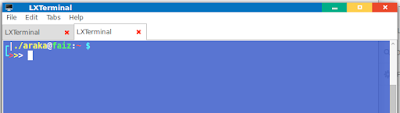
kalau Kalian suka silahkan Copy dan ganti bashrc kalian menjadi seperti ini:
Baca Juga : Cara Membuat Akun Gmail Tanpa Verifikasi Nomor Hanphone Hanya 1 Menit
Oke mungkin sedikit yang bisa saya bagikan semoga kalian menyukainya dan bermanfaat bagi kalain semua. Kalau ada yang mau ditanyakan bisa coret coret dibawah. Salam Araka ID
Oke selesai basa basinya sekarang ane mau bagi bashrc hasil modifan saya dibawah merupakan tampilanya

kalau Kalian suka silahkan Copy dan ganti bashrc kalian menjadi seperti ini:
Baca Juga : Cara Membuat Akun Gmail Tanpa Verifikasi Nomor Hanphone Hanya 1 Menit
# ~/.bashrc: executed by bash(1) for non-login shells.
# see /usr/share/doc/bash/examples/startup-files (in the package bash-doc)
# for examples

# If not running interactively, don't do anything
case $- in
    *i*) ;;
      *) return;;
esac

# don't put duplicate lines or lines starting with space in the history.
# See bash(1) for more options
HISTCONTROL=ignoreboth

# append to the history file, don't overwrite it
shopt -s histappend

# for setting history length see HISTSIZE and HISTFILESIZE in bash(1)
HISTSIZE=1000
HISTFILESIZE=2000

# check the window size after each command and, if necessary,
# update the values of LINES and COLUMNS.
shopt -s checkwinsize

# If set, the pattern "**" used in a pathname expansion context will
# match all files and zero or more directories and subdirectories.
#shopt -s globstar

# make less more friendly for non-text input files, see lesspipe(1)
#[ -x /usr/bin/lesspipe ] && eval "$(SHELL=/bin/sh lesspipe)"

# set variable identifying the chroot you work in (used in the prompt below)
if [ -z "${debian_chroot:-}" ] && [ -r /etc/debian_chroot ]; then
    debian_chroot=$(cat /etc/debian_chroot)
fi

# set a fancy prompt (non-color, unless we know we "want" color)
case "$TERM" in
    xterm-color) color_prompt=yes;;
esac

# uncomment for a colored prompt, if the terminal has the capability; turned
# off by default to not distract the user: the focus in a terminal window
# should be on the output of commands, not on the prompt
#force_color_prompt=yes

if [ -n "$force_color_prompt" ]; then
    if [ -x /usr/bin/tput ] && tput setaf 1 >&/dev/null; then
    # We have color support; assume it's compliant with Ecma-48
    # (ISO/IEC-6429). (Lack of such support is extremely rare, and such
    # a case would tend to support setf rather than setaf.)
    color_prompt=yes
    else
    color_prompt=
    fi
fi

if [ "$color_prompt" = yes ]; then
    PS1='${debian_chroot:+($debian_chroot)}\[\033[01;32m\]\u@\h\[\033[00m\]:\[\033[01;34m\]\w\[\033[00m\]\$ '
else
    PS1='${debian_chroot:+($debian_chroot)}\u@\h:\w\$ '
fi
unset color_prompt force_color_prompt

# If this is an xterm set the title to user@host:dir
case "$TERM" in
xterm*|rxvt*)
    PS1="\[\e]0;${debian_chroot:+($debian_chroot)}\u@\h: \w\a\]$PS1"
    ;;
*)
    ;;
esac

# enable color support of ls and also add handy aliases
if [ -x /usr/bin/dircolors ]; then
    test -r ~/.dircolors && eval "$(dircolors -b ~/.dircolors)" || eval "$(dircolors -b)"
    alias ls='ls --color=auto'
    #alias dir='dir --color=auto'
    #alias vdir='vdir --color=auto'

    #alias grep='grep --color=auto'
    #alias fgrep='fgrep --color=auto'
    #alias egrep='egrep --color=auto'
fi

# colored GCC warnings and errors
#export GCC_COLORS='error=01;31:warning=01;35:note=01;36:caret=01;32:locus=01:quote=01'

# some more ls aliases
#alias ll='ls -l'
#alias la='ls -A'
#alias l='ls -CF'

# Alias definitions.
# You may want to put all your additions into a separate file like
# ~/.bash_aliases, instead of adding them here directly.
# See /usr/share/doc/bash-doc/examples in the bash-doc package.

if [ -f ~/.bash_aliases ]; then
    . ~/.bash_aliases
fi

# enable programmable completion features (you don't need to enable
# this, if it's already enabled in /etc/bash.bashrc and /etc/profile
# sources /etc/bash.bashrc).
if ! shopt -oq posix; then
  if [ -f /usr/share/bash-completion/bash_completion ]; then
    . /usr/share/bash-completion/bash_completion
  elif [ -f /etc/bash_completion ]; then
    . /etc/bash_completion
  fi
fi


export PS1="\[\033[1;36m\]┌\[\033[1;37m\]|\[\033[1;33m\]./\u\[\033[1;37m\]@\[\033[1;32m\]\h\[\033[1;37m\]:\[\033[1;31m\]\w \[\033[1;36m\]\\$ \[\033[0m\]
\[\033[1;36m\]└\[\033[1;31m\]>\[\033[1;33m\]>\[\033[1;39m\]> \[\033[0m\]" ;


alias hapus='clear'
alias tulis='nano'
Oke mungkin sedikit yang bisa saya bagikan semoga kalian menyukainya dan bermanfaat bagi kalain semua. Kalau ada yang mau ditanyakan bisa coret coret dibawah. Salam Araka ID

Berkomentarlah degan sopan